 HATCHABOT
ChatGPT and Claude give you one brilliant assistant, in their app, for you. Hatchabot is an open-source agentic operating system: it turns one AI account into a staff of agents that live on a computer you own — each with its own job and memory, each a Telegram contact your whole family can message.
And it manages itself. Hatchabot comes with its own agent — a manager you talk to in plain words. "Which agents look unhealthy?" "Make a travel agent for the Sicily trip." It reads everything, changes nothing, and hands you a card to confirm.
the open-source agent runtime · one isolated container per agent · a front door people already have — Telegram, or just the web app
bash -c "$(curl -fsSL https://hatchabot.com/install.sh)"
One line on a Linux or macOS machine that stays on. Then the app walks you through your first agent.
The first question
Fair question — and more so every year. They remember you now. They run tasks on a schedule. They read your Drive. For one person in one app they are excellent, and Hatchabot doesn't try to beat them at it: it uses one of them as the brain. Four things change once the assistant has to serve a household.
Sharing an assistant over there means everyone has an account with them: ChatGPT projects invite people who have their own, Claude's want a paid seat each. Here your family just messages a contact in Telegram — no app, no AI account, no extra seat. Anyone who wants to make agents of their own gets a sign-in on your machine, not a subscription, and every agent runs on your one AI account.
Both remember you now, and both let you view, edit and export what they remember. The difference is where it lives and who uses it: a Hatchabot agent's memory is a plain file on your disk that the agent reads directly. You can back it up with everything else, run it under another model, or move it to another machine, without anyone's export button.
One assistant answers your tax question, your kid's homework and your condo board in the same voice, from the same context. Hatchabot agents are separate by design — their own persona, model, data and people — and they can consult each other mid-task, which no consumer chat app lets an ordinary subscriber do.
Their scheduled tasks run inside their app, with the tools they built, across your whole account. A Hatchabot agent runs on your computer with exactly what its job needs: this folder, that git repo, a Google account whose mail tool has sending switched off (a tool setting, not a Google permission — don't rely on it against someone determined). Put one on a local model and your conversations never go to an AI company. The agent still uses the internet for search and tools, and chat apps carry messages through their own servers.
The honest version: if you're the only one using it and you're happy inside one app, the chat apps are more polished, need no setup, and are the better deal. Hatchabot is for when there are several jobs, several people, and things you'd rather keep on hardware you own. Comparisons describe the consumer apps as of September 2026.
The Hatchabot supervisor
Your built-in Hatchabot agent — the first tile, with the gold star — watches how every agent uses its AI. It keeps each one on the least capable model that does its work well — a cheaper model for an agent that's overserved, a stronger one for an agent that struggles — and catches the ways tokens get wasted. It proposes; you confirm every change.
Every week it reads a scorecard for each agent: what it's for, how hard it leans on tools, how often it fails, and what it would cost on each model its AI source offers. Thin evidence or a small saving means no change — and it never wakes a sleeping agent to find out.
Every model change is recorded with the old model's figures. Within a week the new model is measured the same way; if failed turns or tool errors went up, Hatchabot proposes switching back. A card for a cheaper model spells out its risks before you decide.
A chat message retried again and again, a scheduled task failing run after run, two agents consulting each other in circles: Hatchabot marks the tile, puts it under Alerts with the fix, and sends one message on Telegram. It clears itself when the loop stops. For a task that keeps failing, it proposes pausing it until it's fixed — a card you confirm.
Every message re-sends the whole conversation, so a long one costs more on every turn. When one grows large, it proposes a compaction now, or a cap so the agent compacts on its own — each a card you confirm.
Once a week it checks the prompt cache, what scheduled tasks cost, how big the instruction files are and how much the agents think — and opens with the savings line: "Right-size: ≈ $12.40 this month", counted from what agents actually used since each switch.
Each agent's icon carries what its last week cost — "$4/wk" — and a Cost view lists the fleet most expensive first. Hear each time an agent spends another $5, or another $100 — you pick the step — and give it a monthly limit if you like: at the limit it moves to a cheaper model or pauses until the 1st. The price list behind every figure is in the app, with the date it was checked.
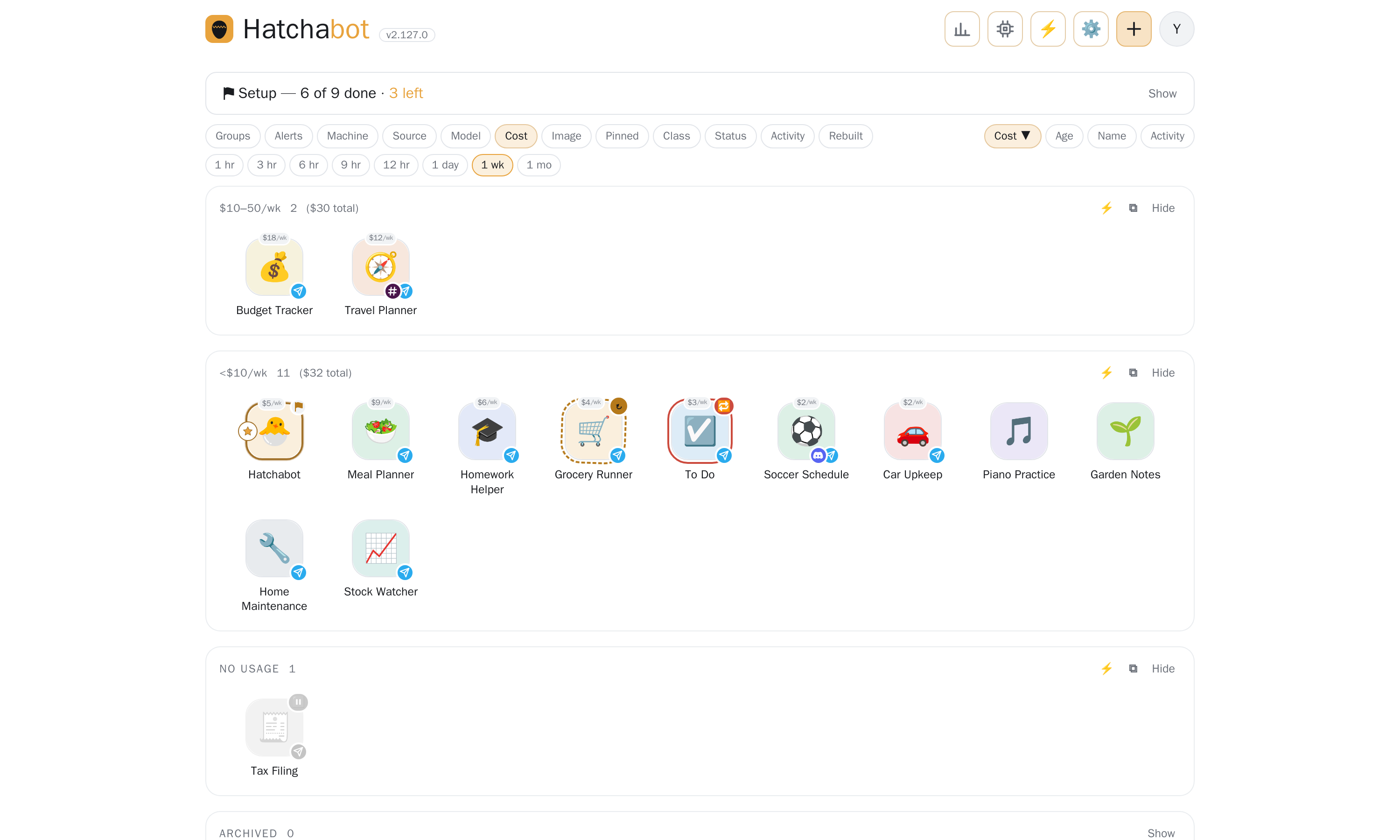
ChatGPT's Auto picks a model for each message, inside OpenAI's app, by its own rules; Claude's apps have you choose. Hatchabot does it per agent, under your control, with the evidence and the savings shown. Dollar figures are estimates — the tokens each agent actually used, at Anthropic's list API prices — and the ones above are examples. If you connect your own Claude plan instead, nothing is billed per token, so the figure is room in the plan's limits, not money. It can't see how much of a plan's limit is left — Anthropic doesn't report that to a setup token — so on a plan the figures are a measure of use, not of what remains. It never changes an agent on its own: every switch, compaction, cap or pause is a card you confirm.
One AI account, the whole household
A tutor for the kids, a planner the whole family shares, your own tax and investing advisors — every agent in the house runs on the one AI account you connect, on your machine. Nobody else needs an AI account or an app: they just message the agents made for them on Telegram.
Your credential stays on your computer, and people talk to your agents, never to your account. Connect an Anthropic API key (pay per use) or a local model (nothing per message). If you already have a Claude Pro or Max plan, you can connect it on your own machine instead, under Anthropic's terms for that plan.
An example household
The control panel
Every agent is an icon you can name, colour and drag into groups. The icon itself tells you how the agent is: a spinning ring while it rebuilds, a mark for each app that reaches it, a dot when it has said something you haven't read. Your Hatchabot agent is the first icon on the page, with a gold star, and each tile shows what its last week cost. Status shows how many are awake, what the fleet asked your AI in the last hours, anyone knocking, and anything waiting for you. It's a web page on your own machine — no cloud dashboard, nothing to log in to but this.
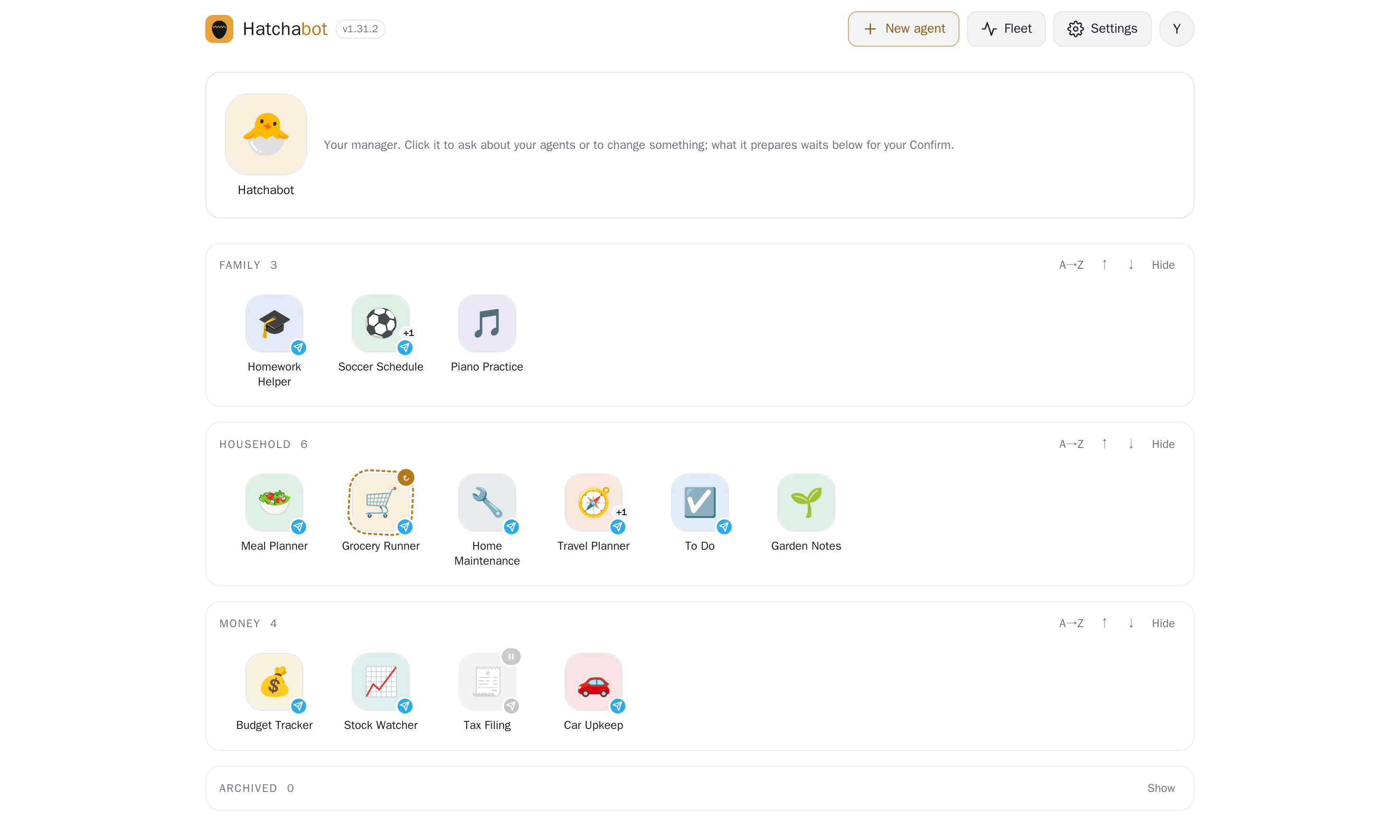
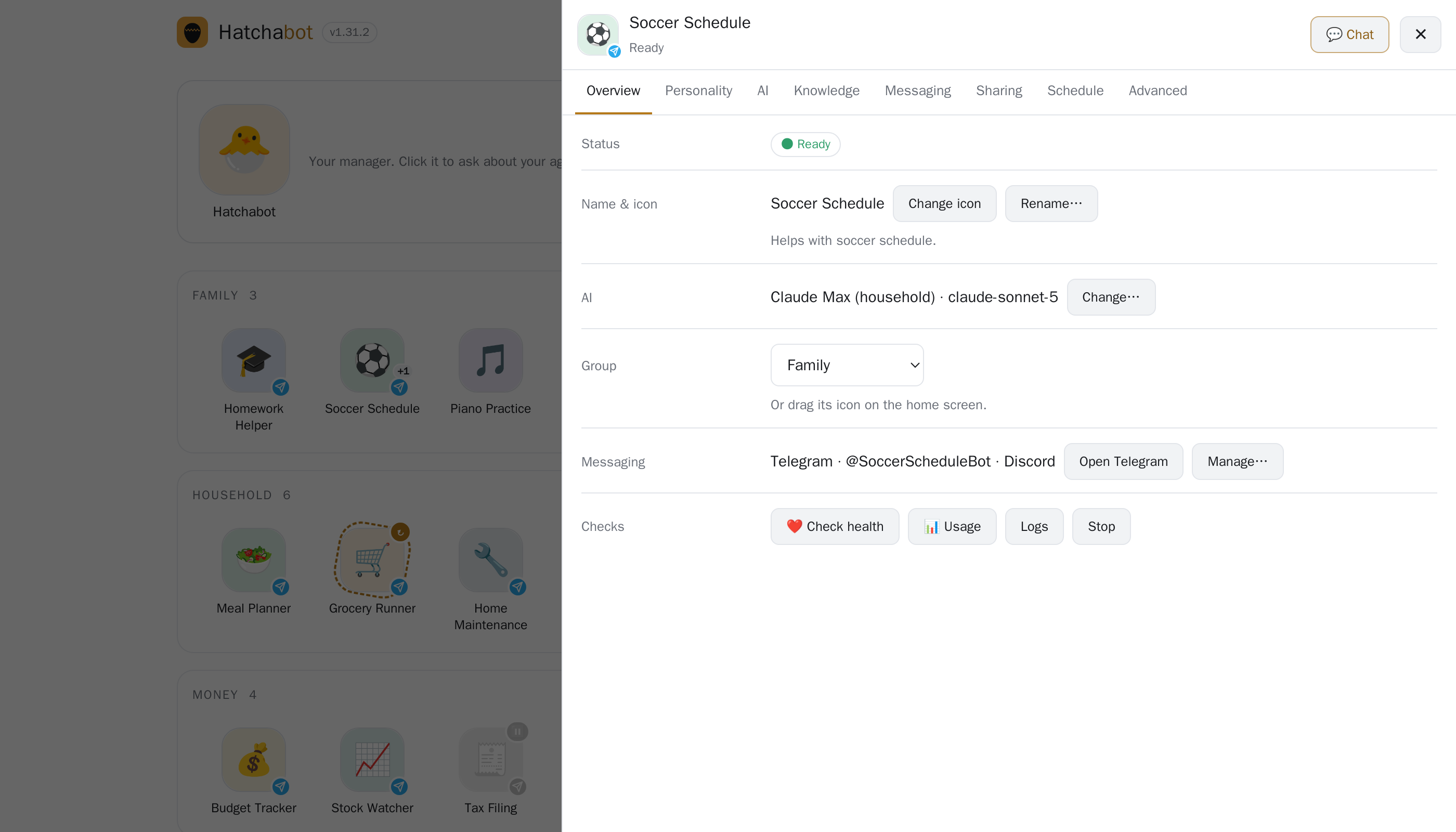
Your Hatchabot agent is the first icon on the page. Ask it in plain words — "which agents look unhealthy?", "make a travel agent for the Sicily trip" — and it does the reading itself. Anything that would change something comes back as a card you confirm on the home screen, with what it will do and how risky it is — and if you give the manager its own Telegram bot, it messages your phone to say a card is waiting. It runs on whichever AI you already have, and it can only propose: Hatchabot carries the change out.
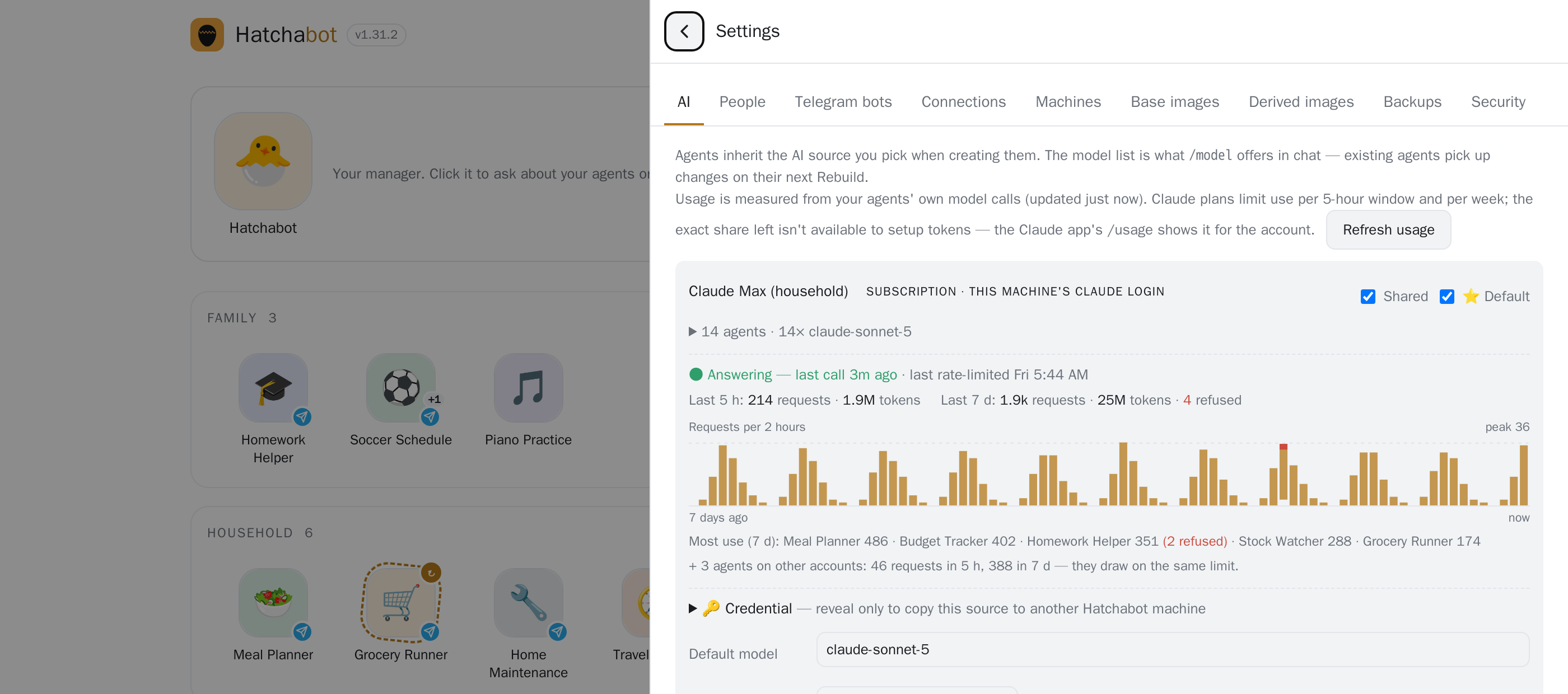
Agents share one AI account, so one busy agent can run up the bill or use up a plan's limit. Each AI source shows requests and tokens for the last 5 hours and 7 days, which agents are the heaviest, and a red banner the moment calls start getting refused. Each agent's tile shows what its last week cost at API prices.
What you actually buy from a frontier lab
A chat app is a product built around a model, and the company that owns the model owns the product: how the agent behaves, what it remembers, which tools it may touch, what it costs next year, and whether it still exists next year.
Hatchabot takes one thing from them — tokens — and leaves the rest in the open. The runtime is OpenClaw, the control plane is this project, both open source and MIT. How an agent thinks, what it remembers, what it may reach and who may talk to it are decided by files on your machine and by code anyone can read, fork and fix.
Which is why swapping labs is a setting, not a migration: an agent moves between Claude, Gemini and a local model without being rewritten (switching providers takes a rebuild and starts a fresh conversation, with memory kept). When a vendor retires an interface — OpenAI shut down its Assistants API in August 2026 and retires Agent Builder in November — your agents don't go with it.
Features
Hatchabot's own agent, on whichever AI you already pay for. Ask it to make, fix, rebuild, archive or clone an agent, or to invite someone; it reads health, logs, usage and files, and every change comes back as a card you confirm. It also tells you what to add — the gaps beside the agents you have, or a job one agent is quietly doing twice. It also supervises the fleet's models, keeping each agent on the least capable one that does its job. It lives in a network jail with a key that can only propose, and it messages your phone when something is waiting.
A name, a paragraph and a bot token. Clone one that works, import a template someone shared, keep a launchpad of ones you're planning.
Claude, Gemini or a local model, per agent. Switch models within a source instantly; switching providers takes a rebuild and starts a fresh conversation, with memory kept. Cheap models for simple jobs, the best one where it matters — or nothing per message at all.
Per agent: a folder, a git repo, a Google account whose mail tool has sending switched off (a tool setting, not a Google permission — don't rely on it against someone determined). Each agent gets what its job needs and nothing else — and its Files tab lets you browse what it made, open or download any of it, and drop files in for it to use.
Scheduled tasks, and event-triggered ones where a zero-cost check decides whether to wake the model at all. Agents message you first when it matters.
Your investing agent asks your tax agent mid-task — with scoped tokens, loop guards and rate limits.
Telegram, or the web app — an agent can have its own bot, or none at all. Talk to it directly, share it with several people, or put it in a group room — it keeps one memory for everyone and one conversation for direct messages, and says so. Strangers who find a bot get silence (while an invite window is open, a stranger gets a short pairing reply) — only people you invited, or already know, get through. Slack and Discord work too.
Health, usage per source and per agent, an audit trail, nightly backups with a restore drill, and upgrades you try on one agent before the fleet.
Built on OpenClaw, the open-source agent runtime: every Hatchabot agent is a stock OpenClaw gateway in its own Docker container. Hatchabot adds the layer OpenClaw leaves to you — many isolated installs, run as a fleet, by more than one person.
Ownership
You control every part of an agent: its definition (persona, rules and memory, in files you can read and edit), the tools it uses and the schedules it runs on, the machine it runs on, the AI behind it, the data it can reach, who can talk to it, and which agents it can consult. And you can download it all as one file.
Definition, memory, members, its Telegram bot and its secrets — even the recipe for its runtime image. Discord and Slack bots stay behind and are re-attached there. Keep it as a backup, or restore it on any machine where Hatchabot runs. Moving an agent to another machine, or to another Hatchabot, is one action.
Its persona, instructions and schedules, with no bot, members or secrets. You choose whether its memory goes too — read it before you send it. Someone else runs it on their own accounts. Nothing about an agent lives anywhere you can't see, copy, edit or take with you — and nothing is locked to a vendor or a login.
Build on it
An agent is a container with a job, its own credentials and its own memory, and you make one by describing it in English — no code, no deployment. The first takes an afternoon; the twentieth takes a minute, because everything under it is already standing. Some of the shapes that makes possible:
A meeting scheduler with its own inbox: people send their availability, it negotiates a time with every invitee, and runs group votes to an answer. Nobody needs Telegram or an account.
A property manager for a condo corporation, with that client's mail and files — then cloned for the next one. Separate containers, credentials and memory: nothing mixes.
A QA agent wired to the one it tests, running regressions so you know it still answers correctly after a change.
Export one as a single file — persona, instructions and schedules, with no bot, members or secrets; you choose whether its memory goes too — and someone else runs it on their own accounts.
OpenAI and Anthropic sell excellent engines and SDKs to build on. What they don't hand you is the layer around many long-lived agents: tenancy, credentials on your own hardware, a front door people already have, and one console for the fleet. That layer is Hatchabot — and as its operator, uptime, backups and security are yours.
Compared
A chat app is a place you go to talk to one assistant. Hatchabot is a staff of agents that live on your machine and come to you.
| Claude.ai / ChatGPT | Hatchabot | |
|---|---|---|
| Shape | One assistant, one app, one person | A staff of agents with jobs, for a household |
| Who can use it | You; others need their own account, and a paid seat on Claude | Anyone you invite, on Telegram, with no account of their own |
| Memory | Kept by the provider; you can view, edit and export it, but it lives in their app | Text files on your disk: read them, fix them, back them up, take them with you |
| Acts on its own | Scheduled tasks, inside their app, with the tools they built | Schedules, events, and requests from other agents — on your machine |
| Access to your things | The connectors they built, across your whole account | Per agent: one folder, one repo, one account — with limits you set |
| Choice of AI | That company's models | Claude, Gemini or a local model, per agent — models switch instantly; a new provider takes a rebuild, with memory kept |
| Who decides how it behaves | The vendor — their client, their rules, their roadmap | Open source (MIT): files you edit, code anyone can fork — you buy only the inference |
| If you leave | Your history stays with them | Export it, move it to another machine, change provider — the agents are yours |
The honest caveat: the chat apps are polished, need no setup, and their models are excellent. Hatchabot doesn't compete with the model — it uses one, Claude by default. It competes with the app around the model. (Coding agents like Codex and Claude Code are a different tool again: one agent, one repo, one task — and one of the things you can build here.)
How it works
Telegram on their phones — each agent is a contact — or the Hatchabot app itself, each with their own sign-in. Slack and Discord work too.
Node + SQLite on your machine: registry, encrypted secrets, scheduler, health, backups, audit trail.
One OpenClaw gateway per agent, with its own bots, volume and credentials — dozens on one box.
API key or Claude plan · Gemini · a local model · folders · git repos · a Google account.
Each agent's home directory is a Docker volume: persona, memory, sessions, tools. The runtime image is shared, versioned and swapped under an agent without touching the volume — so an upgrade or rebuild never costs an agent its memory.
Get started
In Telegram, open @BotFather, send /newbot, pick a name, and keep the token it gives you. You can skip this and talk to your agents in the app, then add Telegram later.
Create an API key at console.anthropic.com (billed per use). Or, if you have your own Claude Pro or Max plan, connect that instead: install Claude Code with npm i -g @anthropic-ai/claude-code, sign in, and run claude setup-token. That use is between you and Anthropic, under their terms, which can change.
On the computer that stays on, run:
bash -c "$(curl -fsSL https://hatchabot.com/install.sh)"
Docker is the only thing it needs, and it offers to install that. On Ubuntu, Debian and Apple-silicon Macs it downloads Hatchabot ready to run, with everything it needs inside: no Node, no compiler. It pulls the agent runtime image, starts the background service, and ends with the address to open and a QR code for your phone. hatchabot doctor checks the result.
Go to http://localhost:8080 on that computer and create your account — you become its owner. The setup guide then takes your API key (or token) and the bot token, creates your first agent, and can turn on HTTPS over Tailscale so it opens on your phone.
Click its icon to chat in the app, or open its Telegram link and send a message. It will still remember what matters from this conversation next year.
A Linux or macOS computer that stays on, with Docker (the installer offers it) — a Mac mini, a home server, an old laptop.
Optionally a Telegram account, if you want to reach your agents from your phone (Slack and Discord work too).
An AI: an Anthropic API key, a local model with no account at all, or your own Claude Pro or Max plan.
Quick start · Philosophy · Slide deck · Releases · Security
Questions
You need to be comfortable pasting one command into a terminal, once. After that everything happens in the web app and in Telegram. The people you invite need nothing but Telegram.
The software is free and open source (MIT). You bring the hardware and the AI. An Anthropic API key is billed per token: a light agent costs a few dollars a month, a busy one with long conversations much more, and Hatchabot shows what each agent uses. A local model costs nothing per message. If you already pay for a Claude Pro or Max plan, you can connect it on your own machine instead; your agents then share that plan's usage limits, and Anthropic's terms for the plan apply. Either way, the people you set agents up for don't need an AI account of their own.
Any Linux or macOS computer that stays on and runs Docker. The runtime image is about 2 GB, and each agent is one container with its own volume. Each awake agent uses about 1 GB of memory: a 16 GB machine keeps half a dozen awake, more if idle ones sleep. A second machine can host agents too, over Tailscale.
Agents, their memory and your credentials live on your machine. Messages travel through Telegram (or through nothing at all, if you chat in the app), and each turn is sent to the AI provider you chose for that agent — or to no AI company, if the agent runs on a local model (it still uses the internet for search and tools).
They can find a bot — Telegram usernames are public — but they get silence. An agent only listens to people you invited or who already use one of your agents; an invite can even name the one person it is for. Anyone else's message is dropped before it reaches the agent, and you are never bothered with it (while an invite window is open, a stranger gets a short pairing reply).
Everyone in the household has their own sign-in. If a family member forgets theirs, you send them a one-time reset link from the app and they choose a new one — you never see it. If you forget yours, "Forgot password?" sends a link to the Telegram account you linked — no email server needed. (With nothing linked, the owner resets it with one command on the machine.)
Every agent runs in its own container with its own bot and credentials, bot tokens, API keys and Google tokens are encrypted at rest, and the app is meant to be reached over your private Tailscale network, never a port opened to the internet — the setup guide turns that on in one press. Everyone signs in as themselves. A daily posture check flags agents that combine a wide audience with a powerful capability. AI keys and setup tokens reach an agent through a private file. The code has been through more than thirty full audits, most recently a full review on 29 September 2026 (six reviewers across the whole codebase, each finding checked again by a second), the night after a review of every area by eighteen reviewers; see SECURITY.md to report an issue.
No. Telegram is the easiest start — it's free, it's on every platform, and a new bot takes a minute at @BotFather — or an agent can be on nothing at all: you then talk to it in the Hatchabot app itself. Slack and Discord work too. Every chat app connects outward from your machine, so nothing of yours has to be reachable from the internet.
Every Hatchabot agent is an OpenClaw gateway. Hatchabot gives each one its own isolated install and adds what a fleet needs: creating, rebuilding, moving and backing up agents; inviting people; managing credentials once; and upgrading one agent at a time. For a single personal agent, plain OpenClaw is fine.