HATCHABOT

Your AI should be a staff, not a search box.

ChatGPT and Claude give you one brilliant assistant, in their app, for you. Hatchabot is an open-source agentic operating system: it turns the plan you already pay for into a staff of agents that live on a computer you own — each with its own job and memory, each a Telegram contact your whole family can message.

OpenClaw+Docker+Telegram=Hatchabot

the open-source agent runtime · one isolated container per agent · a front door people already have — Telegram, Slack, Discord, or just the web app

bash -c "$(curl -fsSL https://hatchabot.com/install.sh)"

One line on a Linux or macOS machine that stays on. Then the app walks you through your first agent.

TelegramChats
🍳
Kitchen HelperTonight: the lentil soup you liked in March?
🧾
Tax AdvisorReceipt filed under 2026 deductions.
📅
SchedulerBooked Thu 2 pm — it’s on the calendar.
📚
Homework TutorFractions set done — 9 out of 10.
🛡
Cyber AdvisorRouter firmware is two versions behind.
Illustration — each agent is its own Telegram contact

The first question

“Can't ChatGPT or Claude already do this?”

Fair question — and more so every year. They remember you now. They run tasks on a schedule. They read your Drive. For one person in one app they are excellent, and Hatchabot doesn't try to beat them at it: it uses one of them as the brain. Four things change once the assistant has to serve a household.

Everyone gets agents. Nobody gets an account.

Sharing an assistant over there means everyone signs in: ChatGPT projects invite people who have their own accounts, Claude's want a paid seat each. Here your family just messages a contact in Telegram — no app, no login, no extra seat — and each person can have their own agents, with their own memory, on your one plan.

The memory is a file you own.

Both remember you. Neither lets you open that memory, correct a wrong fact, back it up, or carry it to another company — Claude will import memories from the others, but nothing comes back out. A Hatchabot agent's memory is a text file on your disk, and it survives a rebuild, a change of model, and a move to another machine.

A staff, not one generalist.

One assistant answers your tax question, your kid's homework and your condo board in the same voice, from the same context. Hatchabot agents are separate by design — their own persona, model, data and people — and they can consult each other mid-task, which no consumer chat app lets an ordinary subscriber do.

It runs on your machine, with your things, scoped.

Their scheduled tasks run in their cloud, with the tools they chose, across your whole account. A Hatchabot agent runs on your computer with exactly what its job needs: this folder, that git repo, a Google account that may read mail but never send. Put one on a local model and nothing leaves the house at all.

The honest version: if you're the only one using it and you're happy inside one app, the chat apps are more polished, need no setup, and are the better deal. Hatchabot is for when there are several jobs, several people, and things you'd rather keep on hardware you own. Comparisons describe the consumer apps as of September 2026.

One subscription, the whole household

Everyone gets their own agents. You pay for one plan.

A tutor for the kids, a planner the whole family shares, your own tax and investing advisors — every agent in the house runs on the same Claude plan, on your machine. Nobody else needs an AI account, an app or a password: they just message the agents made for them on Telegram.

Your credential stays on your computer, and people talk to your agents, never to your account. Prefer to pay per use, or not at all? Any agent can run on an API key or a local model instead.

1Claude plan
4people in the house
12agents with their own jobs
0apps to install for the family

An example household

The control panel

Your whole staff on one page

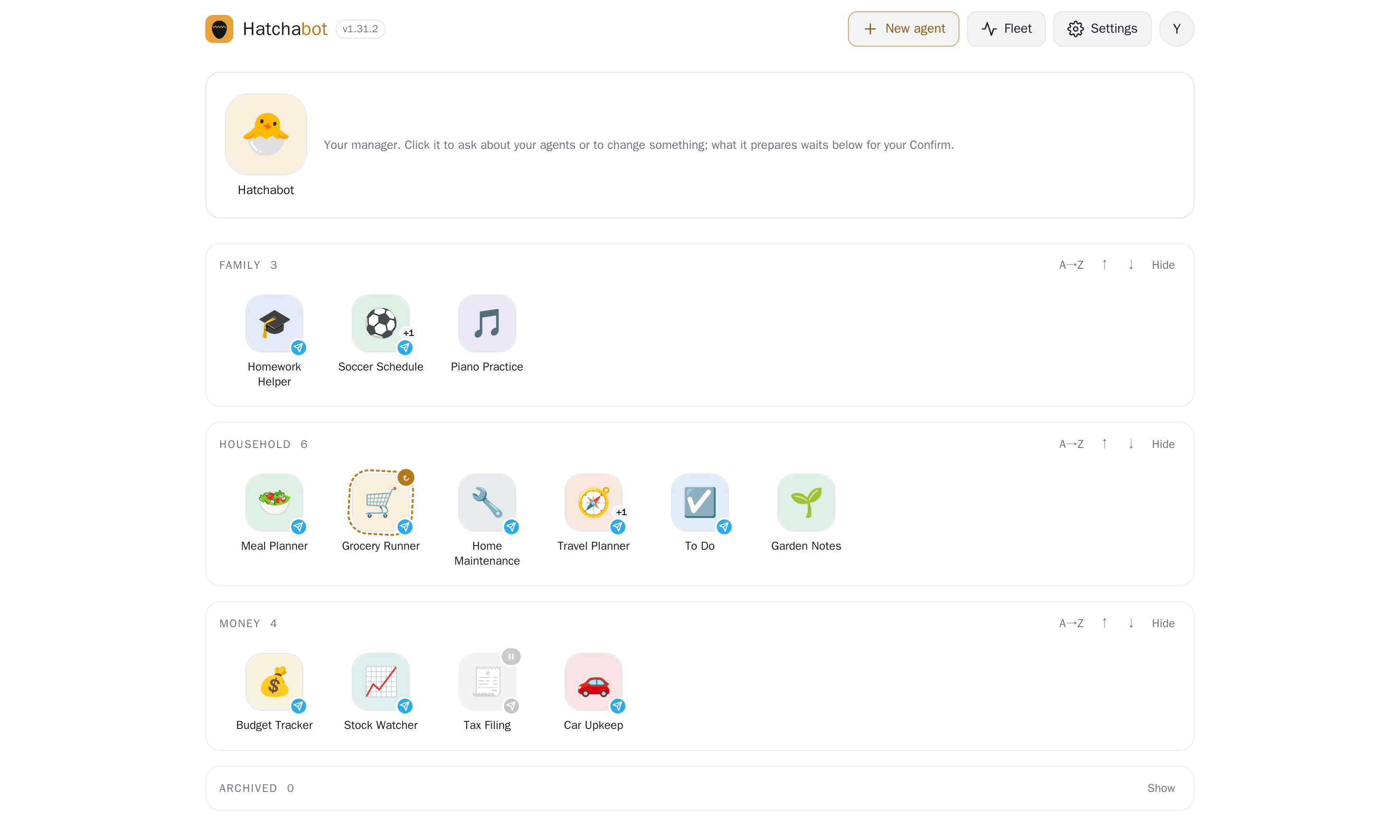
Every agent is an icon you can name, colour and drag into groups. The icon itself tells you how the agent is: a spinning ring while it rebuilds, a mark for each app that reaches it, a dot when it has said something you haven't read. Click one to talk to it; everything about it lives behind one settings sheet. It's a web page on your own machine — no cloud dashboard, nothing to log in to but this.

The Hatchabot home screen: a big icon for the Hatchabot manager agent, then the household's agents as labelled icons grouped into Family, Household and Money, each showing its status and the apps that reach it
An example fleet — the agents and their names are made up for this picture.

A manager agent, not a menu

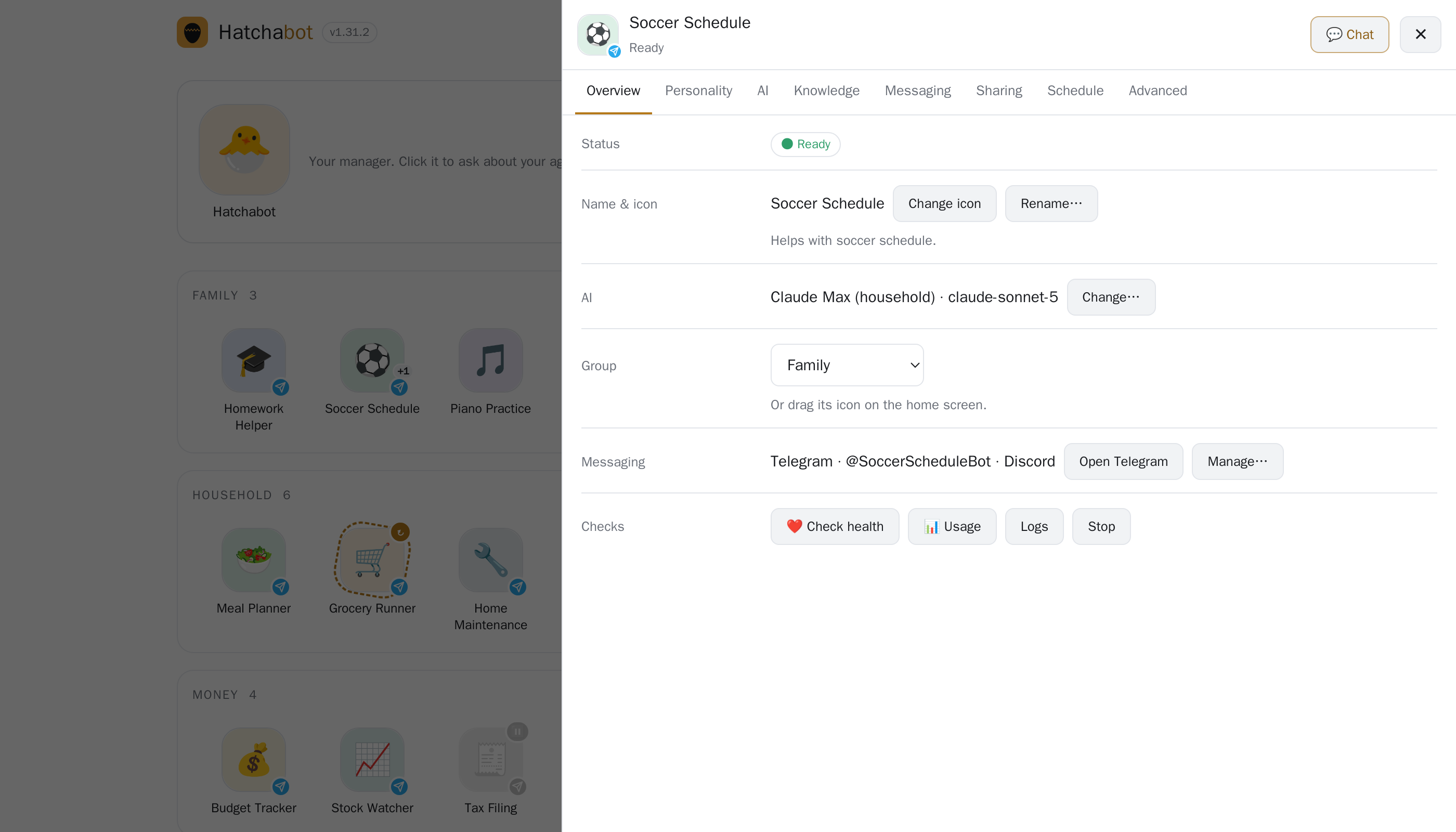
The big icon at the top is your Hatchabot agent. Ask it in plain words — "which agents look unhealthy?", "make a travel agent for the Sicily trip" — and it does the reading itself. Anything that would change something comes back as a card you confirm, on the home screen or in Telegram, with what it will do and how risky it is. It runs on whichever AI you already have, and it can only propose: Hatchabot carries the change out.

One agent's settings sheet: status, name and icon, which AI it uses, its group, the messaging apps that reach it, and health checks

Know what your plan is spending

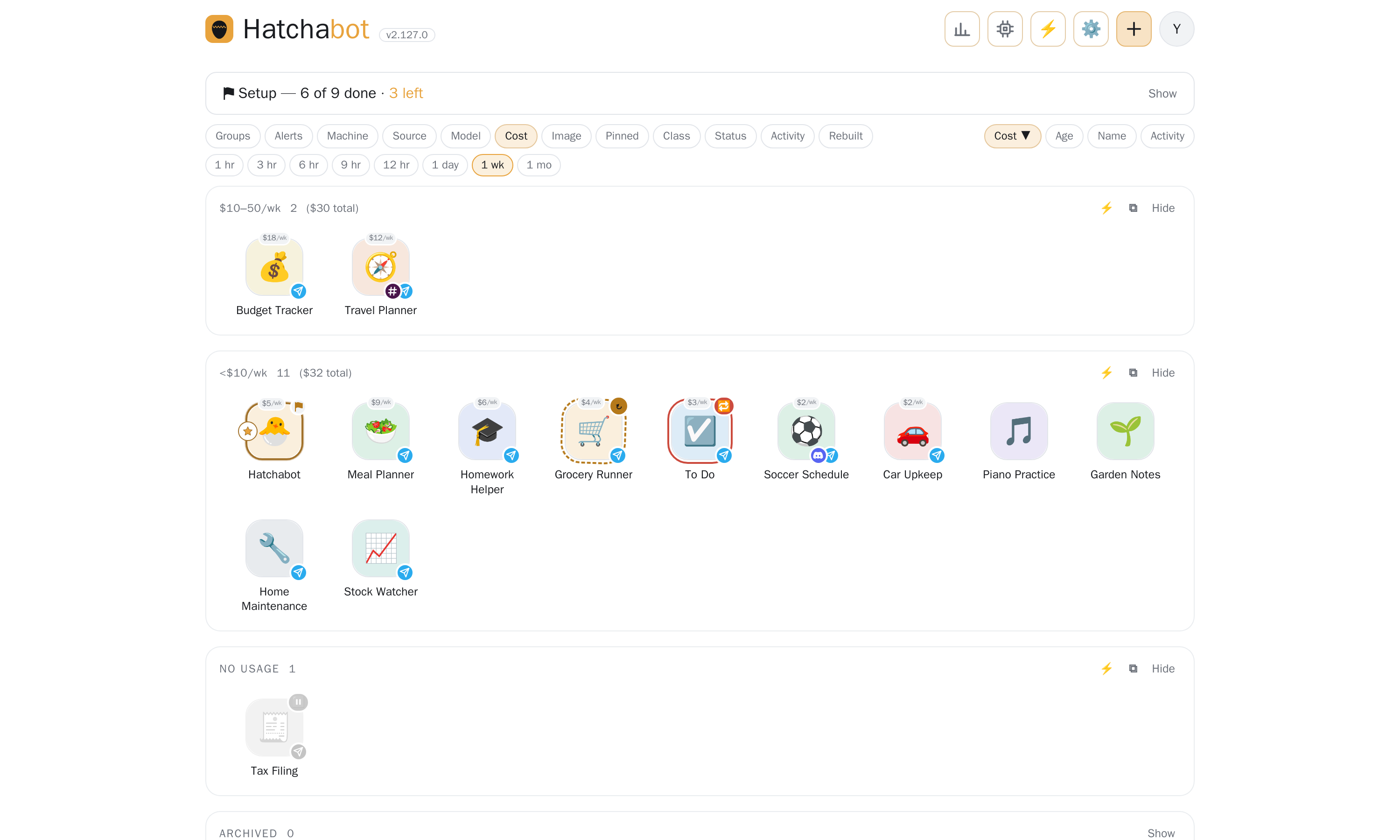
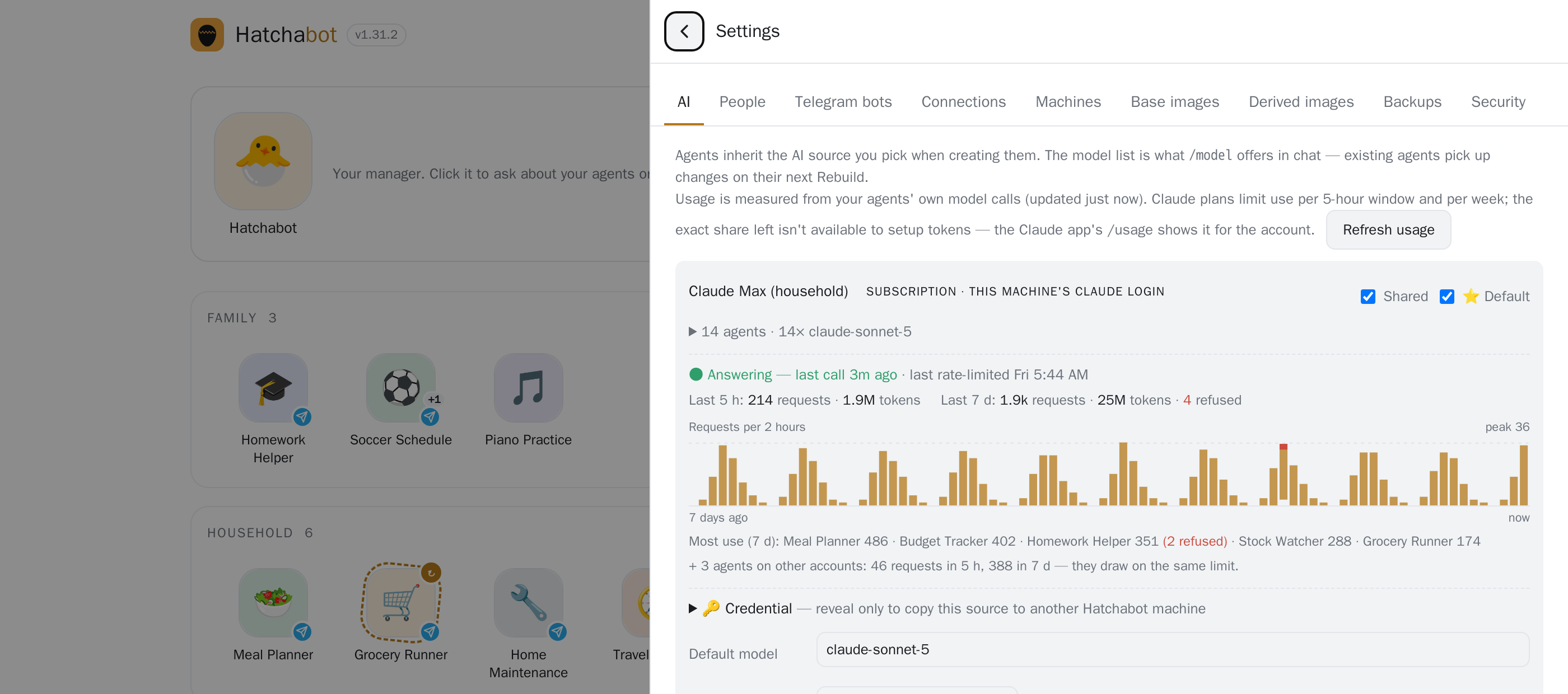
Agents share one subscription, so one busy agent can use up everyone's limit. Each AI source shows requests and tokens for the last 5 hours and 7 days, which agents are the heaviest, and a red banner the moment calls start getting refused.

Usage for an AI source: requests and tokens for the last 5 hours and 7 days, a 7-day chart, and the agents using it most

What you actually buy from a frontier lab

Inference. That's the whole list.

A chat app is a product built around a model, and the company that owns the model owns the product: how the agent behaves, what it remembers, which tools it may touch, what it costs next year, and whether it still exists next year.

Hatchabot takes one thing from them — tokens — and leaves the rest in the open. The runtime is OpenClaw, the control plane is this project, both open source and MIT. How an agent thinks, what it remembers, what it may reach and who may talk to it are decided by files on your machine and by code anyone can read, fork and fix.

Which is why swapping labs is a setting, not a migration: an agent moves between Claude, Gemini and a local model without being rewritten. When a vendor retires an interface — OpenAI shut down its Assistants API in August 2026 and retires Agent Builder in November — your agents don't go with it.

Features

What a staff can do that an assistant can't

A new agent in a minute

A name, a paragraph and a bot token. Clone one that works, import a template someone shared, keep a launchpad of ones you're planning.

🧠

A different brain per job

Claude, Gemini or a local model, switchable live. Cheap models for simple jobs, the best one where it matters — or nothing per message at all.

🔑

Your accounts and files, scoped

Per agent: a folder, a git repo, a Google account that can read mail but never send. Each agent gets what its job needs and nothing else.

Work while you sleep

Scheduled tasks, and event-triggered ones where a zero-cost check decides whether to wake the model at all. Agents message you first when it matters.

🤝

Agents that consult each other

Your investing agent asks your tax agent mid-task — with scoped tokens, loop guards and rate limits.

💬

Reachable where people already are

Telegram, Slack or Discord — an agent can be on one, several, or none at all and answer in the web app instead. Each agent has its own bot; strangers get a code you approve, not a conversation.

🐣

A manager you can talk to

Ask the Hatchabot agent to make, fix, move or share an agent. It can read everything and change nothing: every change comes back as a card you confirm here or in Telegram.

📊

Run like infrastructure

Health, usage per source and per agent, an audit trail, nightly backups with a restore drill, and upgrades you try on one agent before the fleet.

Built on OpenClaw, the open-source agent runtime: every Hatchabot agent is a stock OpenClaw gateway in its own Docker container. Hatchabot adds the layer OpenClaw leaves to you — many isolated installs, run as a fleet, by more than one person.

Build on it

An operating system for agents — including the ones you sell

An agent here is a container with a job, its own credentials and its own memory. Hatchabot is the layer that creates, connects, schedules, watches and upgrades a fleet of them on a machine you control — which is what it takes to put AI inside a real operation instead of a chat window.

And the cost curve bends the right way. The first agent takes an afternoon: the machine, the AI source, the bot pool, the image, the backups. The twentieth takes a minute, because all of that is already standing. Once the infrastructure is there, trying an idea stops being a project and becomes a name and a paragraph — so you make the agent you'd never have bothered to build.

Built on it: a meeting scheduler anyone can email

It has its own Gmail account. Anyone — no Telegram, no login, no account of any kind — emails it with their availability and who's required or optional, and it negotiates by email with each invitee until it finds a time that works. It runs votes too: put a decision to a group and it drives the thread to an answer.

It was built by describing it in English. No code, no deployment, no glue.

Then a second agent was built to test it: a QA agent wired to the scheduler both ways, running regressions to check it still answers correctly. The whole scheduler travels as one portable file you can hand to someone else.

Building on it: managing condo corporations

Attach the property manager's Gmail and the corporation's Drive to one agent — scoped to that agent, and the mail tool can be attached with sending switched off until you trust it.

Then give it the job: draft board-meeting minutes, collect contractor quotes and drive them to a decision, keep the corporation's files in order, track open issues, watch the reserve fund, sanity-check the books. Schedules do the unattended parts; the manager talks to it on Telegram like a colleague.

Then clone it for the next corporation. Each client gets its own container, credentials and memory — nothing mixes. Improve the master and push the improvement down to the copies.

Always on, on hardware you own

Holding a client's mailbox for a year and acting on it at 6am takes a computer that's yours and never sleeps. Hosted agent platforms bill by the session-hour and keep the state on their servers.

One isolated tenant per client

Container, bot, secrets, memory — separate by construction. “Where does our data live?” has a physical answer you can point at.

A front door they already have

Your client messages a Telegram contact — or emails an address the agent owns. No app for you to build, no account with an AI vendor, no seat for everyone in their office.

Portable by design

Move an agent between Claude, Gemini and a local model without rewriting it. OpenAI shut down its Assistants API in August 2026 and retires Agent Builder in November — for a builder, portability isn't theoretical.

An agent is a thing you can give away — or sell

Export any agent as a single file: its persona, its operating rules, its schedules, its shape — with the credentials and the private memory stripped out. Someone else imports it, points it at their own accounts, and adapts it. Share a template by link, or hand over a whole working agent.

That makes a market in agent apps possible without a store, a runtime lock-in or a revenue share: the configuration and the training are the product, and you own a fleet of them.

Conversations you can't have with one assistant

One agent, one person

A private thread — the ordinary case, and the agent remembers that person specifically.

One agent, many people, privately

Each person gets their own thread with the same agent, with memory shared across them or kept personal — and everyone is told which.

One agent in a room

A group chat with the family, the board, or the office, where the agent answers everyone at once.

Agent to agent

Your stock advisor asks your legal and tax agents mid-task instead of guessing — with scoped tokens, loop guards and rate limits you set.

The honest version: OpenAI and Anthropic are very extensible, and people ship real products on them — the Claude Agent SDK and Managed Agents (stateful sessions, scheduled runs, sandboxes on your own infrastructure), the OpenAI Agents SDK, apps inside ChatGPT. They sell you the engine. What none of them hands you is the operating layer around many long-lived agents: tenancy, credentials at rest on your own hardware, a human front door, and one console to run the fleet. That layer is the product here — and you are the operator, so uptime, backups and security are yours too.

Compared

Side by side

A chat app is a place you go to talk to one assistant. Hatchabot is a staff of agents that live on your machine and come to you.

Claude.ai / ChatGPTHatchabot
ShapeOne assistant, one app, one personA staff of agents with jobs, for a household
Who can use itYou; others need their own account, and a paid seat on ClaudeAnyone you invite, on Telegram, with no account of their own
MemoryKept by the provider — you can clear it, not read or move itText files on your disk: read them, fix them, back them up, take them with you
Acts on its ownScheduled tasks, in their cloud, with their toolsSchedules, events, and requests from other agents — on your machine
Access to your thingsThe connectors they built, across your whole accountPer agent: one folder, one repo, one account — with limits you set
Choice of AIThat company's modelsClaude, Gemini or a local model — per agent, switchable live
Who decides how it behavesThe vendor — their client, their rules, their roadmapOpen source (MIT): files you edit, code anyone can fork — you buy only the inference
If you leaveYour history stays with themExport it, move it to another machine, change provider — the agents are yours

The honest caveat: the chat apps are polished, need no setup, and their models are excellent. Hatchabot doesn't compete with the model — it uses one, Claude by default. It competes with the app around the model. (Coding agents like Codex and Claude Code are a different tool again: one agent, one repo, one task — and one of the things you can build here.)

How it works

One control plane, one container per agent

Your family

Telegram, Slack or Discord on their phones — each agent is a contact — or the Hatchabot app itself.

Control plane

Node + SQLite on your machine: registry, encrypted secrets, scheduler, health, backups, audit trail.

Agent containers

One OpenClaw gateway per agent, with its own bots, volume and credentials — dozens on one box.

AI & data

Claude Max or API · Gemini · a local model · folders · git repos · a Google account.

Each agent's home directory is a Docker volume: persona, memory, sessions, tools. The runtime image is shared, versioned and swapped under an agent without touching the volume — so an upgrade or rebuild never costs an agent its memory.

Get started

Your first agent in 15 minutes

  1. Make a Telegram bot (optional)

    In Telegram, open @BotFather, send /newbot, pick a name, and keep the token it gives you. You can skip this and talk to your agents in the app, then add Telegram, Slack or Discord later.

  2. Get Claude ready

    Install the Claude CLI with npm i -g @anthropic-ai/claude-code, log in once, then run claude setup-token and keep that token too.

  3. Install Hatchabot

    On the computer that stays on, run:

    bash -c "$(curl -fsSL https://hatchabot.com/install.sh)"

    It checks for git, Docker and Node 22 (and offers to install what's missing), fetches the latest release, pulls the pre-built runtime image and installs the background service. hatchabot doctor checks the result.

  4. Open the app

    Go to http://localhost:8080. A setup wizard takes the Claude token and the bot token, then creates your first agent.

  5. Say hi

    Click its icon to chat in the app, or open its Telegram link and send a message. It will still remember this conversation next year.

You need

A Linux or macOS computer that stays on, with Docker and Node 22+ — a Mac mini, a home server, an old laptop.

Optionally a Telegram, Slack or Discord account, if you want to reach your agents from your phone.

An AI: a Claude subscription (Pro for a couple of agents, Max for a household), an API key, or a local model with no account at all.

Read more

Quick start · Philosophy · Slide deck · Releases · Security

Open source, MIT1,188 automated tests19 full auditsPre-built images for arm64 and amd64Tagged releases with notes

Questions

Frequently asked

Do I need to be technical?

You need to be comfortable pasting one command into a terminal, once. After that everything happens in the web app and in Telegram. The people you invite need nothing but Telegram.

What does it cost?

The software is free and open source (MIT). You bring the hardware and the AI: one Claude Pro or Max subscription runs every agent in the household for a flat monthly fee — the rest of the family doesn't need their own plan to use the agents you set up for them. An API key is billed per token instead, and a local model costs nothing per message.

What hardware do I need?

Any Linux or macOS computer that stays on and runs Docker. The runtime image is about 2 GB, and each agent is one container with its own volume — a Mac mini comfortably runs a household's worth. A second machine can host agents too, over Tailscale.

Where does my data go?

Agents, their memory and your credentials live on your machine. Messages travel through whichever app you use (Telegram, Slack or Discord — none, if you chat in the app), and each turn is sent to the AI provider you chose for that agent — or to nobody, if the agent runs on a local model.

Is it secure?

Every agent runs in its own container with its own bot and credentials, secrets are encrypted at rest, and the app is reached over your private Tailscale network rather than an open port. A daily posture check flags agents that combine a wide audience with a powerful capability. The code has been through fifteen full audits; see SECURITY.md to report an issue.

Does it have to be Telegram?

No. Telegram is the easiest start — it's free, it's on every platform, and a new bot takes a minute at @BotFather — but an agent can be on Slack or Discord instead or as well, or on nothing at all: you then talk to it in the Hatchabot app itself. Slack and Discord each need a small app of their own, which the setup sheet walks you through in three steps. All three connect outward from your machine, so nothing of yours has to be reachable from the internet.

How is this different from running OpenClaw myself?

Every Hatchabot agent is an OpenClaw gateway. Hatchabot gives each one its own isolated install and adds what a fleet needs: creating, rebuilding, moving and backing up agents; inviting people; managing credentials once; and upgrading one agent at a time. For a single personal agent, plain OpenClaw is fine.